quick notes manager, personal agenda
English: day planner/personal organizer ExstoraRussian: day planners/note manager ExstoraSvenska: daglig planerare/noteringar ExstoraFrench: planificateur de taches et gestionnaire de notesGerman: Terminverwaltung, Tagesplaner  
Planner Calendar Extora
Day planner Navigation planner Organizer
 
Main
Personal Organizer
Compare Editions
Screenshots
Downloads
Buy Now
Online Help
Contacts
Personal Organizer
News
  • Apr 03 2009 Exstora version 2.4 and 2.4 Pro released.
  • Jul 04 2008 Exstora version 2.3 and 2.3 Pro released.
  • Mar 24 2008 Exstora version 2.2 and 2.2 Pro released.
  • Mar 14 2008 Exstora version 2.1 and 2.1 Pro released.
  • Dec 21 2007 Exstora version 2.0 and 2.0 Pro released.
  • Oct 28 2007 Special Offer:
    10% Discount!
  • Oct 16 2007 Website was translated to German. Thanks to Dennis Alperstedt!
  • May 03 2007 Exstora version 1.4 and 1.4 Pro released.
  • Feb 24 2007 Exstora version 1.3 and 1.3 Pro released.
  • Version History...
Extora, Exstora
Personal Agenda About Exstora: Personal Agenda, Note Manager
Note Manager, Planner Calendar

Note Manager, Planner Calendar -
Exstora Freeware and Exstora Pro

  • Version: 2.4
  • Release date: April 3, 2009
  • File size: 372 kBytes/516 kBytes
  • System requirements:
    Windows 2000-XP-2003-Vista, RAM: 64 Mb, HDD: 10Mb
Agenda Software, Note Manager
Download Buy Now

During design of the Exstora Note Manager, emphasis was placed upon the speed of adding a new note and notes management. As a result, operating the program is extremely simple and without problems even for those who are not expert users.

The program is ideal for fast saving of short notes and scheduling of specific events, with easy management of notes. The Note Manager feature allows the organizing notes by category.

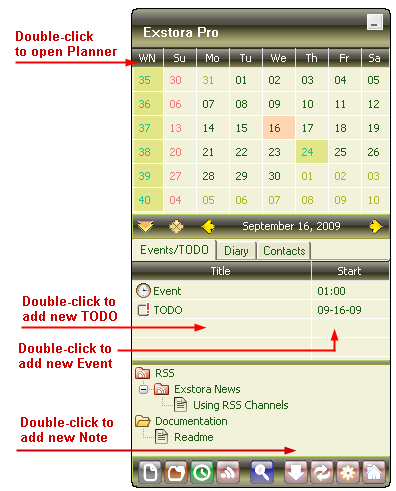
The main window consists of the following three sections: Calendar, Events (Planner), and Notes manager.

To add a new note, just double-click on the empty space in the Notes manager window.

To add a new event, just do the same in the Personal Organizer window.

To quickly preview a note, just point the mouse cursor at the note you wish to preview.

A scheduled event can easily be moved to a different date by simply dragging and dropping the event to the date you need on the calendar.

You can start taking notes and planning events as soon as program installation is complete; the software is so simple that you will not even need the help file.

The program features include:
  • Speed: only "two mouse clicks" to open the editor window of personal organizer
  • User-friendly navigation and flexible administration of stored notes and planner events
  • Built-in day planner/organizer to remind you of scheduled events
  • A long-term scheduling feature with daily time checks until task completion
  • Recurrent scheduled events in the day planner (day by day, every hour, every Monday etc)
  • Operation via removable media (ie USB flash drive)
Exstora Pro version also includes:
  • RSS / Atom feeds
  • Diary
  • Gantt Chart (Planner)
  • Day planner/calendar import/export capability from/to iCal files (Outlook, Google Calendar, etc.)
  • Printing option for notes and planner items
  • Several color schemes (including user-defined)
Personal Agenda, Note Manager, Planner Calendar